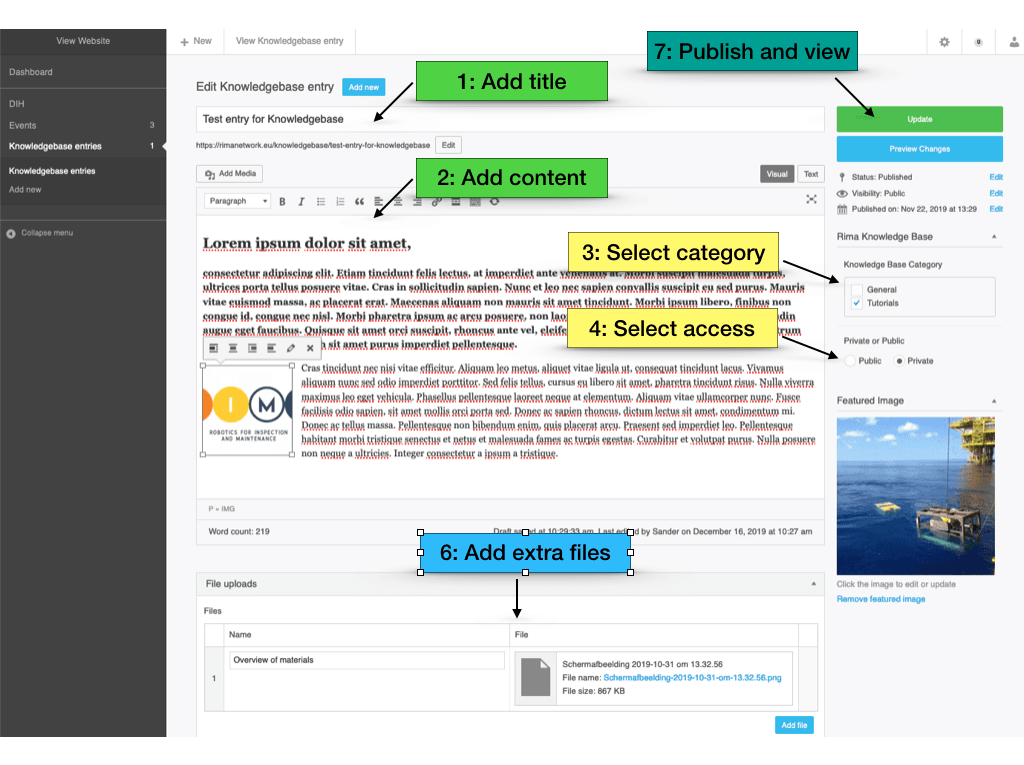
Here an overview of the steps to create your Knowledge base article:
You will be creating the article in the back-end of the website, so be sure to log in first. Here you can see and edit all of your articles.
In the editor itself, it is a basic setup for creating new content.
The title
The content. This can be HTML. And you can add custom images, and links to extra content on the web. (or you can add files at step 6)
The category for this article to be visible in.
Is this article public or do users need to be logged in to see this content?
Add an “featured” image, so the article looks nice. And it will be used in the archive pages too.
Add extra files (eg. Powerpoint, PDF’s, images.) This list of files will be added on the bottom of the article, so users can download them, and view locally.
After all is done, you can publish the article and see it in the frontend of the website. It will popup in the overviews and searchresults once it is indexed by the system.
This content is blocked. Accept cookies to view the content.
This website uses cookies to give you the best experience. Agree by clicking the 'Accept' button.